Zitadel Onboarding — Default Org + Service User + PAT
After core-service is deployed and healthy, it still runs on placeholder IAM credentials. This page onboards core-service to Zitadel: identify the default organization, create a dedicated service (machine) user, grant it management rights, mint a Personal Access Token (PAT), and wire both the PAT and the org ID into the running service.
Why this is needed
core-service uses Zitadel as its IAM. Two config values are consumed at runtime:
iam_service.pat— a service-account token core-service uses to call the Zitadel management API (validate users, create per-user PATs, fetch IDP settings). Used iniam_service/middleware/auth_middleware.py.iam_service.default_org_id— the organization core-service operates in (login flows, IDP settings). Used inservices/auth/auth_service.py.
The app starts and passes health checks with placeholders (readiness only checks DB + the Zitadel health URL), but login / user management won't work until these are real.
Prerequisites
- [x] core-service Deployment
Running+Readyinask - [x] Zitadel + zitadel-login pods
1/1;zitadel-setup/zitadel-initjobsCompleted - [x]
sso.ask.mod.auh1.dev.dirin your Mac/etc/hosts→ ingress IP (100.115.2.210) - [x] Vault reachable + unsealed; you can
vault kv put secret/ask/core-service/auh1-dev/*
# /etc/hosts on the Mac (ingress IP for *.ask.mod.auh1.dev.dir)
100.115.2.210  sso.ask.mod.auh1.dev.dir
100.115.2.210  core-service.ask.mod.auh1.dev.dir
Step 1 — Log into the Zitadel console
Open https://sso.ask.mod.auh1.dev.dir (accept the internal-CA cert warning, or trust the air-gap
root CA in your keychain).
| Field | Value |
|---|---|
| Login name | [email protected] |
| Password | Zitadel@ModAuh1Dev1! (the seeded ADMIN_PASSWORD; no forced change) |
If the login name differs
The first-instance admin login is zitadel-admin@zitadel.<ExternalDomain>. Confirm the exact
value from the setup job:
Verify: you land on the Zitadel console home, showing your default organization.
Step 2 — Get the default organization ID
In the console top nav → Organization. The org detail page shows Resource Id, Primary Domain, and State at the top. Copy the Resource Id (a numeric snowflake string).
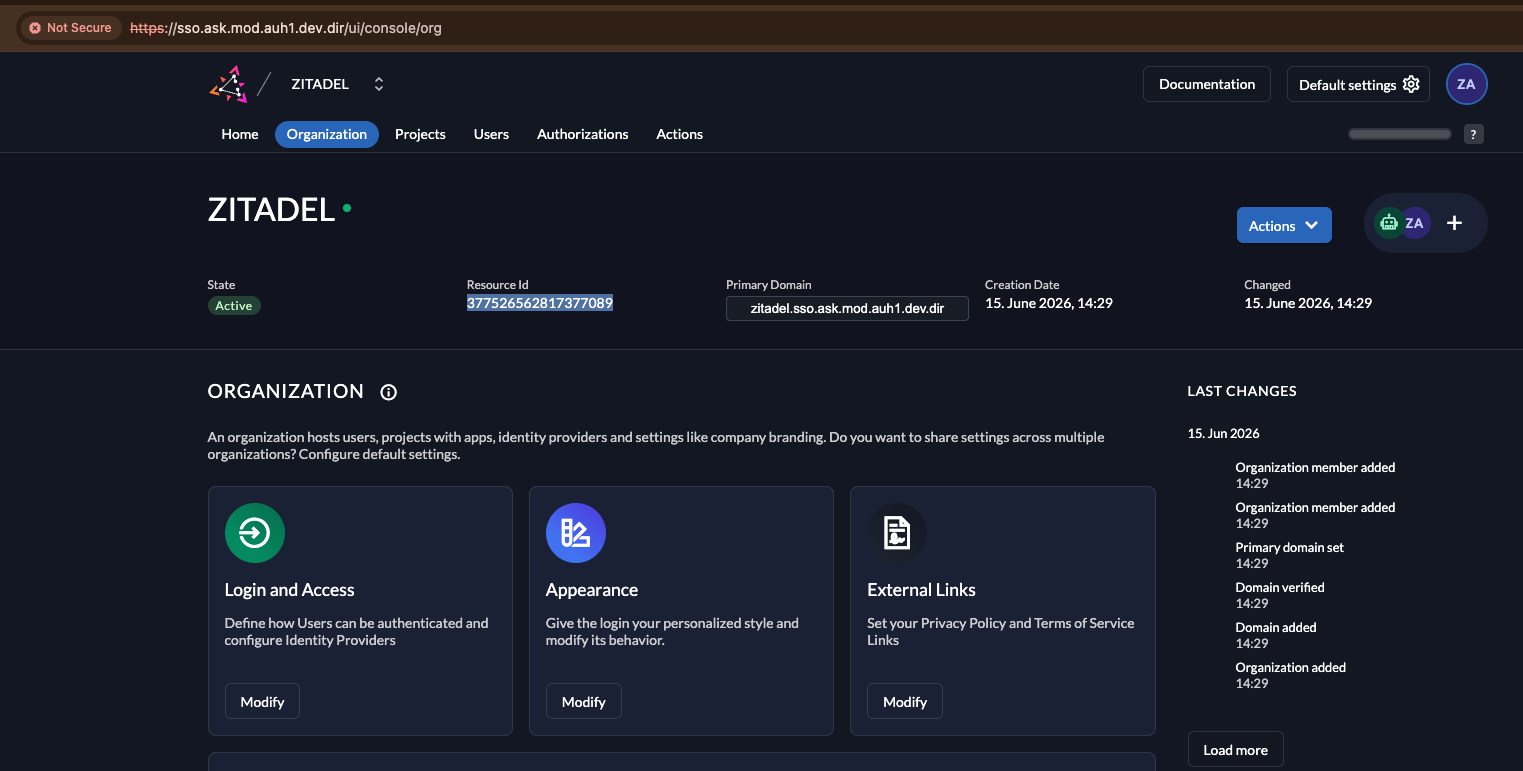
This is default_org_id.
This environment (mod-auh1-dev)
| Field | Value |
|---|---|
| Organization | ZITADEL (default first-instance org) |
Resource Id (default_org_id) |
377526562817377089 |
| Primary Domain | zitadel.sso.ask.mod.auh1.dev.dir |
Alternative — from the Zitadel database
Verify: you have a numeric org ID copied.
Step 3 — Create the service (machine) user
Console → Users → Service Users → New.
| Field | Value |
|---|---|
| User Name | core-service |
| Name / Description | ASK Core Service (machine account) |
| Access Token Type | Bearer |
Create it, then open the new service user. Note its Resource Id (the service user's own ID) if you want it for records.
Verify: the core-service service user exists under Service Users.
Step 4 — Grant management rights (instance-level)
core-service creates and manages organizations in Zitadel (IAMCreateOrganizationRequest,
add-org-domain, org IDP config) — an instance-level operation. So the service user needs an
IAM (instance) manager role, not an org-scoped one. Granting Org Owner alone would let it
manage one org but not create new ones.
Grant it at the instance level: top-right → Default settings (gear) → the Managers
card → + → Add a Manager:
- User → select the
core-serviceservice user. - Role → check
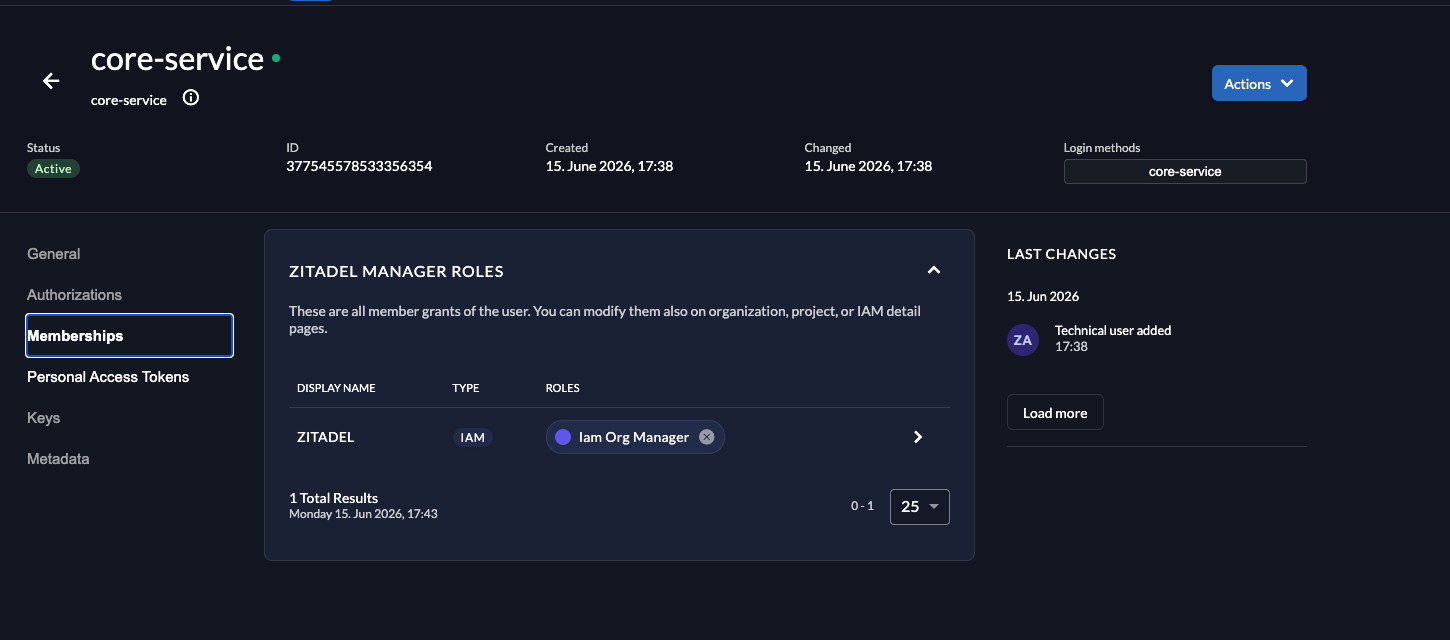
Iam Org Manager(least-privilege: create/manage orgs + their users, PATs, IDPs, sessions). UncheckIam Owner— that also grants instance settings (SMTP, providers) which core-service does not need. - Add.
Least privilege
Iam Org Manageris the right default — it covers org creation + user/PAT/session/IDP management without full instance ownership.Iam Owneris the unblock-everything fallback. Use it only if Step 8 validation shows a403thatIam Org Managercan't satisfy — then document exactly which call needed it.
Verify: the core-service service user appears in the instance Managers list with
Iam Org Manager.
Step 5 — Mint the Personal Access Token (PAT)
Open the core-service service user → Personal Access Tokens → New.
- Optionally set an expiry (production: rotate on a schedule; air-gap dev: a long expiry is fine).
- Copy the token immediately — it is shown only once.
Verify: you have the PAT string copied (a long opaque token).
Step 6 — Wire the PAT into Vault
The core-service-secret ExternalSecret reads IAM_SERVICE__PAT from Vault (property value).
Replace the placeholder:
export VAULT_ADDR=https://vault.cl1.sq4.aegis.internal
vault kv put secret/ask/core-service/auh1-dev/IAM_SERVICE__PAT value="<PASTE-PAT>"

# force the ExternalSecret to re-pull now (else it refreshes within 1m):
kubectl annotate externalsecret -n ask core-service-secret force-sync="$(date +%s)" --overwrite
# confirm the K8s secret updated:
kubectl get secret -n ask core-service-secret -o jsonpath='{.data.IAM_SERVICE__PAT}' | base64 -d | head -c 12; echo '…'
Verify: the decoded secret value starts with your PAT (not placeholder).
Step 7 — Wire the org ID into config (GitOps)
default_org_id lives in the Dynaconf TOML. Update both values files (chart-internal +
mod-ask-devops), replacing the placeholder under [mod-auh1-dev-ask.iam_service]:
[mod-auh1-dev-ask.iam_service]
base_url = "http://core-service-zitadel.ask.svc.cluster.local:8080"
public_base_url = "https://sso.ask.mod.auh1.dev.dir"
pat = "@format {env[IAM_SERVICE__PAT]}"
default_org_id = "<RESOURCE-ID>"      # ← from Step 2
timeout = 30
session_lifetime = "2592000s"
Files:
ask-core-service→helm/environments/values-mod-auh1-dev-ask.yamlmod-ask-devops→applications/core-service/values-mod-auh1-dev-ask.yaml
Commit + push both, then re-sync. The config-toml ConfigMap changes → Stakater Reloader restarts
the core-service pod automatically:
kubectl -n argocd patch application mod-auh1-dev-ask.ask.core-service --type merge \
  -p '{"operation":{"initiatedBy":{"username":"manual"},"sync":{"revision":"HEAD"}}}'
Verify: the new pod starts with the updated ConfigMap (override.toml shows the real
default_org_id):
Step 8 — Validate the integration
8a. PAT valid directly against Zitadel (proves the token + the Iam Org Manager role):
PAT='<your-PAT>'   # local shell var; keep it out of logs/history
# token valid → returns the core-service machine user
curl -sk https://sso.ask.mod.auh1.dev.dir/auth/v1/users/me \
  -H "Authorization: Bearer $PAT" | jq '{id: .user.id, name: .user.userName}'
# org-manager role works → reads the org
curl -sk https://sso.ask.mod.auh1.dev.dir/management/v1/orgs/me \
  -H "Authorization: Bearer $PAT" -H "x-zitadel-orgid: 377526562817377089" | jq '{id: .org.id, name: .org.name}'
name: "core-service" / id: 377545578533356354, and the ZITADEL org. 401 = bad PAT;
403 = role missing a grant (escalate per Step 4).
8b. The values reached the running pod:
# PAT now present in the running env
kubectl exec -n ask deploy/core-service -- printenv IAM_SERVICE__PAT | head -c 12; echo '…'

# readiness still green (IAM health check)
kubectl exec -n ask deploy/core-service -- \
  sh -c 'wget -qO- http://localhost:8000/api/v1/health/ready' ; echo

# exercise an auth/login flow from the UI or an API call that hits Zitadel,
# and watch for successful management API calls (no 401/403 from Zitadel):
kubectl logs -n ask deploy/core-service --tail=40 | grep -iE "iam|zitadel|401|403|pat|org"
Done when: an auth flow against core-service succeeds end-to-end (session created in Zitadel),
with no 401/403 from the management API in the logs.
What's stored where (summary)
| Value | Source of truth | Delivered via | Consumed as |
|---|---|---|---|
| PAT | Vault secret/ask/core-service/auh1-dev/IAM_SERVICE__PAT |
ExternalSecret → core-service-secret |
env IAM_SERVICE__PAT → @format in TOML → iam_service.pat |
| Org ID | Git (TOML in values files) | ConfigMap core-service-config-toml → /app/config/override.toml |
iam_service.default_org_id |
Production follow-ups
- Replace Org Owner with a least-privilege manager role (Step 4).
- Set a PAT expiry + rotation procedure; on rotation, re-run Step 6 only.
- The same pattern applies to every new environment — only the org ID + PAT differ.